
Web.com offers a basic website builder with over 150 templates for professional websites and online stores. The platform offers decent customization options, but the page editor is sometimes a bit underdeveloped. Additionally, Web.com is expensive and requires an upgrade to get important features like search engine indexing. Overall, we think most people would benefit more from an alternative website builder.
PROS
- Very easy to use
- Excellent technical support
- Competitive pricing
CONS
- Editor is somewhat limited.
- Can’t add custom code
Web.com Video Review

How Web.com Works
Web.com Group Inc. is a domain name registration and website building services company based in Jacksonville, Florida. It essentially serves as a one-stop solution for everything you need to create a free website or online store, including a custom domain and email services.
Web.com’s website builder is designed to be accessible to new website builders, but we think there are other website builders that are better suited for this purpose. Its page editor can be difficult to use and takes time to customize. The platform also makes it difficult to find your site unless you upgrade to a more expensive plan.

Using Web.com
The Web.com experience is far from perfect. The backend isn’t specific to the website builder, but rather includes all of Web.com’s services. This means that the available tools, including the editor, are peppered with ads for purchasing additional services.
Furthermore, Web.com’s editor is cumbersome. Pages and widgets load in seconds, and it’s easy to accidentally mess up the layout of a site by moving content elements. However, it offers more design flexibility than other editors, which is a plus if you have time to build your site.
Web.com Features and Tools
Web Hosting
All Web.com sites include web hosting with unlimited storage and bandwidth. You also get a free domain for one year, an SSL certificate, and five email addresses with 2GB of storage each.
Expert Design Service
Every new Web.com web development package includes one hour of personalized customer service and technical support from the company’s design experts. You also have the option to hire Web.com’s design team to build your site. The site will be designed to your specifications, and you can manage it using Web.com’s website builder once it’s up and running.
Web.com AI Builder
Web.com’s new AI-powered website builder revolutionizes the way we create and manage online content. The builder is comprised of several different tools.
There’s AI Writer, a revolutionary tool for easily creating or updating engaging content, ideal for everything from website updates to engaging blog posts. Finding the perfect online identity is now a breeze with the AI-powered domain name generator, which creatively matches your vision with a unique domain name. AI Builder simplifies content creation by efficiently generating the necessary structure and content based on a few quick questions, allowing you to focus more on bringing your ideas to life. Additionally, AI Logo Builder offers a variety of customization options to create a distinctive brand identity with a visually striking logo.
Together, these tools offer a comprehensive solution to easily and creatively promote your online presence.
How to Create a Website with Web.com
The process of creating a website or online store with Web.com starts with choosing a template. The platform has over 150 templates, all of which are mobile-friendly. They’re organized by industry to make it easier to find a design that suits your needs. However, keep in mind that you can’t change them later, so choose carefully.
Web.com templates are highly customizable. You can change not only the color palette and fonts, but also details like header styles, link colors, and button formatting. More options would be nice, but this level of control allows you to customize your template without spending hours on it.
Customizing Content
To customize the content of your site, Web.com offers a drag-and-drop site builder with two different styles of content elements. Features are individual elements, such as text fields, images, and buttons, that you can add anywhere on your site. Blocks are full-width sections of a page with predefined functions. You can add additional functions to blocks to customize them. The combination of features and blocks offers a lot of design flexibility. However, we found that designing content in the Web.com website editor can be difficult. The platform divides each section of a page into columns, and it’s relatively easy to change the layout of an entire section by adding, removing, or moving elements. The column-based layout should be more consistent or eliminated altogether for a smoother experience.
Overall, we were quite happy with Web.com’s website builder, but it didn’t stand out compared to other website builders we tested. Issues with feature design also make testing a lot less fun, as it’s very easy to throw the entire site off balance with a few wrong moves.

Adding Multimedia to Your Web.com Website
Web.com allows you to add photos and videos to your site, but not audio files, PDFs, or other types of multimedia content. You can upload photos from your computer, Instagram, Facebook, Dropbox, Box, or Flickr, or search Unsplash’s library of thousands of photos. Uploaded images are stored in the media library, but they are not searchable.
You can add or replace images by simply clicking on the box next to any image on your site. However, when creating galleries, you must add each photo individually.
Marketing Functionality with Web.com Websites
Web.com requires you to upgrade to its basic plan to access its online marketing features. The main marketing tool offered by Web.com is Local Listings, which is a service that will list your business on Google Maps, Yahoo Local, and Yellowpages.com.
You can connect your site to Instagram, Pinterest, and Disqus, but not to a Facebook business page. Web.com also doesn’t offer email marketing tools.
SEO Functionality & Add-Ons with Web.com Websites
One of Web.com’s biggest issues is SEO management. To get your site to appear on major search engines like Google and Bing, you’ll need to upgrade to your basic plan.
The good news is that if you upgrade your account, Web.com lets you customize your page titles and descriptions for SEO and add alt text to your images. You can also create a blog on any Web.com site.
Web.com doesn’t have its own traffic analysis tools, but you can connect your site to Google Analytics.
Ecommerce
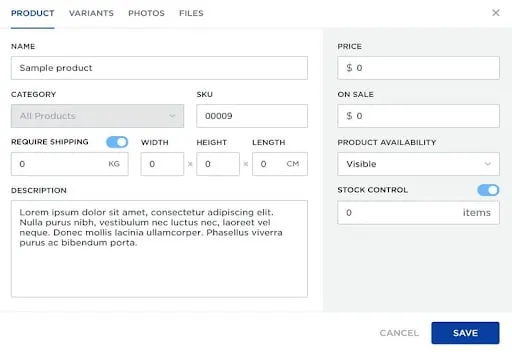
Web.com’s premium plans allow you to sell up to 500 products. You can’t sell digital downloads or gift cards, and the platform doesn’t allow for in-store pickup or local delivery. Web.com also lacks advanced features like inventory management or abandoned cart recovery.
Make sure it’s good, Web.com’s online stores allow you to set up common coding for your pages with Stripe, PayPal, and Square. You can also create an unlimited number of product options for customers to choose from.
The email embargo generally doesn’t make a big impact on Web.com’s email; for the price, we think other website builders offer more advanced tools and better customization options.
Web.com Customer Support
Web.com provides customers with 24/7 phone, email, and live chat support. All new web development plans include one hour of personalized support from the company’s professional designers to help you get started designing your website.
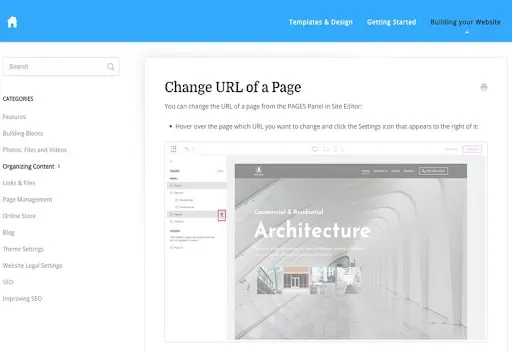
Web.com is built on a shared foundation. However, the articles seem to link to an outdated version of the site builder. Finally, including various tutorials, detailed information about the actual creator, rather than the actual website, is not included on the Web.com website.
Web.com Pricing
Web.com offers the following plans: Starter, Marketing, and Ecommerce. All three offer low introductory prices for the first month, but they don’t include a free trial.
Web.com vs Weebly
Weebly has built a website that uses over 75 templates and many features to sell online. While its advanced plans are more expensive than Web.com’s, Weebly offers essential tools for SEO, inventory management, email marketing, and more. It also has third-party apps that you can use to expand the functionality of your site.
Web.com vs GoDaddy
GoDaddy sees Web.com offering a domain and hosting platform for website creation. However, with GoDaddy, it takes things to its own level. The e-commerce website builder includes an email marketing package, online booking and analytics integration.
Web.com vs Wix
Wix is one of the most customizable website builders on the market and offers over 800 templates to choose from. Wix’s website editor is perfect and comparable to Web.com’s. If Wix is more than Web.com, it has access to expanded marketing and e-commerce features.
Bottom Line
Web.com has created a website relativity based on the choice of plants and options. However, we were very impressed with the platform’s site editor and the lack of features overall for its price. Web.com doesn’t offer email marketing, which is what our plan offers. Start with basic SEO features. Online stores will lack sales tools like inventory management and abandoned cart recovery.
We believe most users will benefit from Weebly, Wix, and GoDaddy’s websites. The three platforms offer more customization options, more marketing tools, and greater support for expanding their own niche.