SITE123 isn’t the most powerful website builder we’ve used, but it lets beginners quickly create their own website. Its section-based editor is extremely simple and intuitive, and you can base your design on any of the hundreds of available templates. The built-in e-commerce, marketing, and blogging tools are functional, but don’t expect them to be overly powerful. The pricing is fair, and the perpetual free plan lets you try out most of the features.
PROS
Very easy to use
Excellent support
Competitive pricing
CONS
Editor is somewhat limited.
Doesn’t let you add custom code
SITE123 Video Review
Overview
SITE123 is a simple website builder that has been on the market since 2015. It has quickly become one of the leading options and is known for its fast and easy-to-use website creation solutions.
Creating a website with SITE123 is a simple process, and there are plenty of video tutorials and articles to help you get started. Consider this platform if you’re looking for a simple website builder that’s ideal for beginners, but explore other options if you need good design flexibility, advanced e-commerce tools, or powerful marketing integrations.
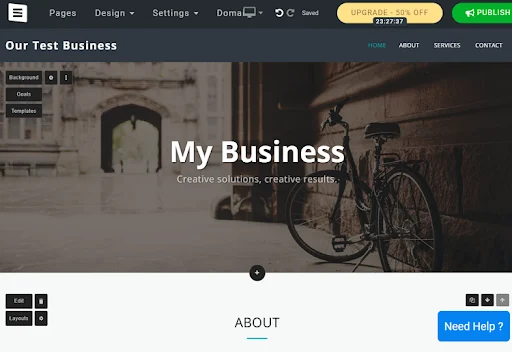
How SITE123 Works
Getting started with SITE123 is easy. You’ll be asked what type of website you want to create, what you want to call it, and you’ll be asked to enter a name, email address, and password to create an account. You can also sign in with Google or Facebook.
The admin panel is a bit clunky, and the overall design feels a bit dated. However, the expected tools are available, and the navigation is intuitive. The editor is fast and responsive, and we didn’t have any issues using it.
SITE123 Features and tools
SITE123 offers a number of unique features that you can take advantage of when creating your new website, whether for personal use or building your online store.
Plugins
There are a number of modules that you can use to integrate with third-party platforms or add additional features to your website. Most of them are free, but some require payment.
Free domain name
All premium subscriptions of 12 months or more include a free domain for the first year.
Multilingual support
All SITE123 websites include multilingual support. Hundreds of languages are supported, and you can display your website in any combination of up to five languages.
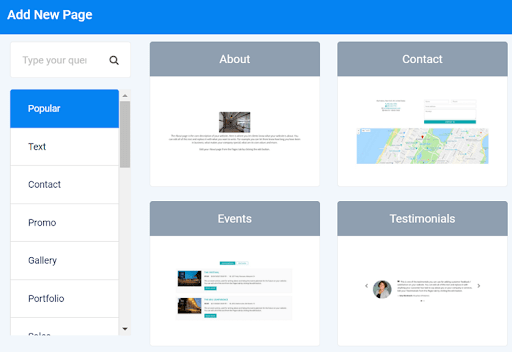
How to Create a Website with SITE123
To create a new website, log in to your SITE123 account and click the “New Website” button in the top right corner of the screen. Follow the instructions and wait a few seconds to access the editor. That’s it.
There are 189 templates available to create a website, and you can switch between them by clicking the “Templates” button in the top right corner of the editor. All designs are fully responsive on mobile devices, but you won’t be able to change the theme once your site is published.
SITE123 uses a basic section-based editor.
You can add or remove pre-designed blocks from each page, allowing you to add the elements you need. Different layouts are available for each block, but you can’t create a custom layout.
As a result, the editor is very easy to use and ideal for beginners, but the design flexibility isn’t up to the standard we’d like to see. You can preview mobile, desktop, and tablet versions of your site, although you can only edit it in desktop mode.
Despite its reputation as a beginner-friendly website builder, SITE123 doesn’t offer any real guidance during the creation process. We would have liked to see some tips or an editor tutorial after our first post, but there was none. There are also no keyboard shortcuts or a design wizard.
As a final note
SITE123 doesn’t let you export sites. This means you can’t leave the platform and take your site (or at least its code) elsewhere.
Overall, SITE123 lived up to our expectations. It’s marketed as an easy-to-use website builder for beginners, and it certainly is. You won’t have access to advanced editing tools or a precise drag-and-drop editor, but you’ll have everything you need to create an attractive website online with minimal hassle.
Adding Multimedia to Your SITE123 website
SITE123 lets you add all the most common image and video file types to your website. Add files to your media library by uploading them directly from your computer. You can also connect to Facebook, Instagram, Google Photos, Google Drive, OneDrive, Dropbox, or Flickr. You can also take photos directly from your device’s camera.
However, you can only upload one media file at a time, and the maximum file size is 100MB. There is integration with the Unsplash media library, but there doesn’t seem to be an easy way to add videos hosted on YouTube or other video hosting platforms.
It also includes a basic image editor, but it’s disappointing and overly simple. Overall, SITE123’s media management tools are good, but we’ve certainly seen better.
Marketing Functionality with SITE123 Websites
SITE123 includes email. Templates are available, but they are basic, and customization is very limited.
There is also a blog section that you can add to any page on your site. The blog manager is very simple, and you will have very limited design and post customization options. You can add multimedia links to your site, but there are no other significant social media tools.
Both the blog and email marketing include basic reporting tools.
SEO Functionality and Add-Ons with SITE123 Websites
SITE123 offers basic SEO tools that you can use to improve your position in search engines. You can access the SEO Advisor through the “Settings” menu in the main control panel. It allows you to add homepage meta tags, a sitemap, a favicon, and a custom domain name. You can also set up 301 redirects if necessary.
The built-in SEO audit tool can be used to detect simple issues, such as missing page descriptions or ineffective title tags. Integration with Google Analytics is available, but the built-in analytics tools are quite limited.
Ecommerce
The SITE123 ecommerce website builder is ideal for those who want to sell online and are looking for a comprehensive tool. SITE123 lets you create template-based websites, set up 301 redirects to point old URLs to new ones, and even includes settings to optimize mobile versions.
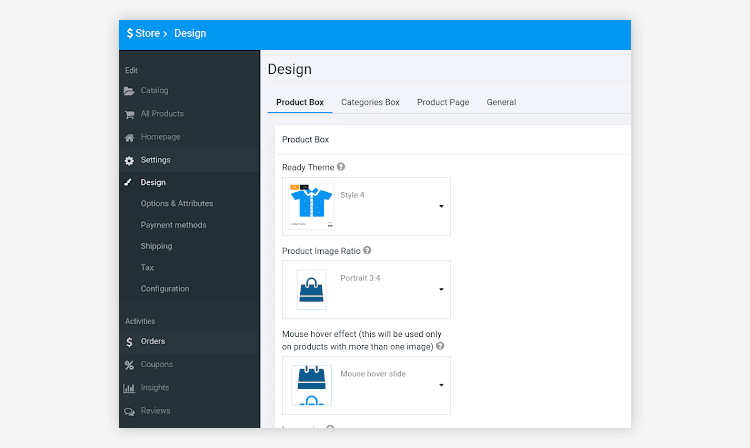
Currency Support & Payment Processing
SITE123 supports over 80 currencies.
SITE123 integrates with 3 payment gateways:
- 2Pay
- The Brain
- Strip
Users can link PayPal and bank accounts to receive payments.
SITE123 does not charge transaction fees, but payment gateways do.
SITE123 Customer Support
It offers 24/7 live chat support, but does not provide email or phone support. You will find a selection of self-help resources in the SITE123 support center. This includes detailed video tutorials, well-written instructions, and various informative articles. We would have liked to see more built-in tips, but the support resources they offer are generally excellent.
SITE123 Pricing
Pricing & Special Offers
In addition to the limited free plan, there are four subscription options, ranging from $12.80 per month to $34.80 for 12 months. Monthly payments are not offered, and prices are significantly higher with a 3-month minimum. There are regular introductory discounts, with even bigger discounts available for 24, 36, 60, and 120-month subscriptions.
Bottom Line
SITE123 offers an excellent website building solution for those with little experience. Its intuitive and easy-to-use editor lets users get started right away. Design flexibility is limited, but there is a good selection of attractive templates and designs to help you create your site.
The built-in tools for blogging, e-commerce, and marketing are fairly basic, but they cover the basics. Pricing is average for the industry, and customer service is acceptable. In short, we recommend giving SITE123 a try if you want to develop an online presence with as little hassle as possible.