
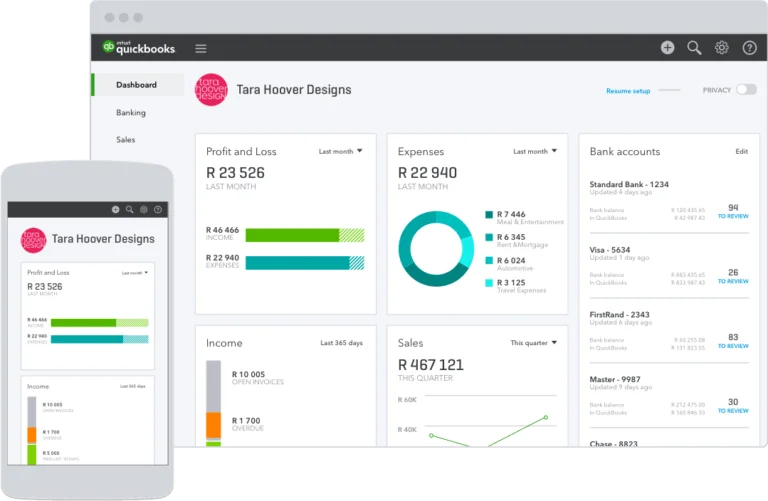
QuickBooks is an accounting software designed for small businesses, with features for managing contractors, managing ledgers, and providing detailed dashboards for valuable business insights.
Pros
- : Dashboard with valuable business information
- Mobile app for keeping track of receipts
- Wide library of integrations
Cons
- : Plans are relatively expensive’
- No free plan
- No direct integration with Slack
QuickBooks at a Glance
Ideal for: Small businesses that need an online accounting system
Price range: Starting at $12.50 for the basic plan
Key features: Manage invoices, expenses, and contractors
Apps: Web, Android, iOS
Integrations: PayPal, Square, Tsheets
QuickBooks Ease of Setup and Use
QuickBooks prioritizes customer engagement. Those considering using the software for their accounting needs are advised to first contact the QuickBooks sales team, which is available Monday through Friday, 9:00 a.m. to 5:00 p.m. Pacific Time. QuickBooks has also created comprehensive onboarding documents to guide customers through the setup process. QuickBooks is an intuitive and easy-to-use platform. Its web interface and mobile apps allow small businesses to update their accounts from the office or on the go.
QuickBooks Pricing and Plans
Users can subscribe to a variety of plans, ranging from the Basic Plan to the Advanced Plan, which is ideal for more experienced users and includes up to 25 users.
The basic payroll cost is an additional $22.50 per month, plus $4 per employee for monthly processing.
QuickBooks Features
Project Profitability Tracking
QuickBooks supports real-time inventory tracking for online sales organizations. The QuickBooks website also includes an inventory tracking system designed to prevent both stockouts and overstocking. Customers can receive instant notifications of expected inventory levels as soon as purchase orders are entered into the system. On-demand reports make it easy for businesses to quickly identify their best-selling products. Online sales reports can be synced with major e-commerce platforms such as Amazon, Etsy, and Shopify.
Real Time Inventory Tracking
Expense Scanning
Users can record expenses in QuickBooks by scanning them and uploading them directly to the platform or by emailing them to a specific address associated with their account. Once receipts are collected, users can categorize them within the system. QuickBooks also uses optical character recognition (OCR) technology to automatically determine the content of scanned receipts, including the date of payment, vendor, payment method, and amount paid. Payments can also be attached to invoices issued. This feature is useful for businesses and freelancers who bill their clients for expenses incurred.
General Ledger and Expense Tracking
Expense Scanning
QuickBooks allows you to enter invoices to track accounts payable and receivable. With QuickBooks, businesses can pay outstanding balances with credit or debit cards, as well as bank transfers. All payment options can be managed from the user area. All paid invoices are recorded and tracked through the system. Users can also connect their bank accounts to automatically track and categorize incoming and outgoing payments. The system also supports deferred invoice payments to optimize cash flow. Professional Invoices
One of the main features of QuickBooks is, of course, the ability to create and send invoices.
Professional Invoicing
- Apply theme settings to ensure that the design and color scheme of their invoices match their internal style and brand guidelines.
- Set up recurring invoices. This is ideal for businesses that pay their customers in installments.
- Add billable hours. To simplify the import process, users can integrate with Google Calendar or TSheets and import their recorded hours.
QuickBooks Integrations
QuickBooks supports a wide range of integrations, allowing customers to get the most out of their online accounting platform by connecting it to other online services.
These include:
- Calendar and time tracking apps. QuickBooks can integrate with Google Calendar and Microsoft Sheets to automatically import and invoice time recorded on customer accounts.
- E-commerce connectors are also available. One example is the BigCommerce QuickBooks app, which allows businesses to automatically generate the necessary documents for online sales.
QuickBooks Mobile Apps
QuickBooks has apps for Android and iOS, which can be downloaded from the Google Play Store and the Apple App Store, respectively. The app only offers the features available in the mobile version of QuickBooks Online Simple Start. Therefore, at the time of writing, customers on the Essentials, Plus, and Advanced plans cannot access their additional features from their mobile versions of the installation. Additionally, the mobile versions allow you to log in to multiple accounts. Those who want to make and process payments directly from their mobile devices can do so using the mobile card reader. Customers can create invoices directly from the app.
QuickBooks Customer Support
Need to contact the QuickBooks customer support team? Intuit offers a comprehensive online troubleshooting section designed to help users resolve their issues before contacting the team.
If you can’t find the answer to your question by consulting the documentation or community forum, you can start a support conversation via live chat or phone. Live chat is available Monday through Friday from 6:00 AM to 6:00 PM Pacific Time and Saturday from 6:00 AM to 3:00 PM. The phone line is available Monday through Friday from 6:00 AM to 5:00 PM, and is closed on weekends.
Bottom Line
QuickBooks is a powerful invoicing and accounting system preferred by small businesses around the world. Its features include tracking contractor expenses, generating project profitability reports, and collecting receipts via direct upload and email. There is no free version, but paying users can choose the premium version that best suits their needs.