


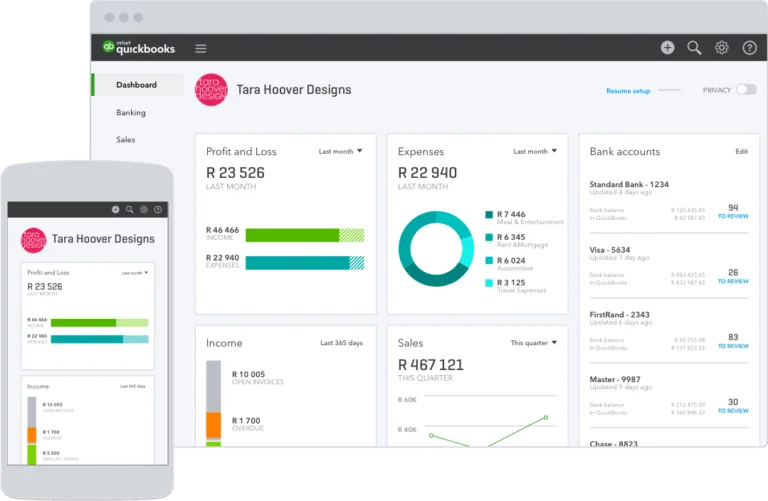
QuickBooks is an accounting software designed for small businesses, with features for managing contractors, tracking invoices, and providing detailed dashboards for valuable business insights.
Pros
- Dashboard with useful information
- Mobile app for saving receipts
- Large library of integrations
Cons
- Plans are relatively expensive
- No free plan
- Doesn’t integrate directly with Slack
QuickBooks at a Glance
Ideal for: Small businesses that need an online accounting system
Prices start at $12.50 for the basic plan
Key features: Manage invoices, expenses, and contractors
Apps: Web, Android, iOS
Integrations: PayPal, Square, Tsheets
QuickBooks Ease of Setup and Use
QuickBooks prioritizes customer engagement. If you’re considering using the software for your accounting needs, we recommend that you first contact the QuickBooks sales team, which is available Monday through Friday, 9:00 a.m. to 5:00 p.m. Pacific Time. QuickBooks has also created comprehensive implementation documentation to guide customers through the setup process. QuickBooks is an intuitive and easy-to-use platform. Its web interface and mobile apps allow small businesses to update their accounts from the office or anywhere.
QuickBooks Pricing and Plans
Users can subscribe to different levels, from the Basic Plan to the Advanced Plan, which is ideal for more experienced users and includes up to 25 users.
Payroll service is available for an additional $22.50 per month, plus $4 per month for processing per employee.
QuickBooks Features
Project Profitability Tracking
With QuickBooks, users can track the profitability of each of their projects. QuickBooks can import company cost and expense (CODB) data to calculate the return on investment (ROI) for each project. For project-based businesses, this feature makes it easy to identify cost overruns and track profitability goals.
Real Time Inventory Tracking
QuickBooks enables real-time inventory tracking for online sales organizations. QuickBooks includes an inventory tracking system designed to prevent both stock shortages and overstocking. Customers can receive instant notifications of projected inventory levels as soon as purchase orders are entered into the system. Demand reports make it easy for businesses to quickly identify their best-selling products. Online sales reports can be synced with major e-commerce platforms such as Amazon, Etsy, and Shopify.
General Ledger and Expense Tracking
Expense Scanning
Users can record expenses in QuickBooks by scanning them and uploading them directly to the platform or by emailing them to a specific address associated with their account. Once receipts are collected, users can categorize them within the system. QuickBooks also uses optical character recognition (OCR) technology to automatically determine the content of scanned receipts, including the payment date, vendor, payment method, and amount paid. Payments can also be attached to issued invoices. This feature is useful for businesses and freelancers who bill their clients for expenses incurred.
Billing and Invoicing
Bill Organization
QuickBooks allows you to record invoices to manage accounts payable and receivable. With QuickBooks, businesses can pay outstanding balances by credit or debit card, as well as by bank transfer. All payment options can be managed from the user area. All paid invoices are recorded and tracked through the system. Users can also connect their bank accounts to automatically track and categorize incoming and outgoing payments. The system also allows you to defer invoice payments to optimize cash flow.
Professional Invoicing
One of the main features of QuickBooks is undoubtedly the ability to create and send invoices. With QuickBooks, users can:
- Customize the theme to match your invoice design and color scheme to your internal style and brand guidelines.
- Set up recurring invoices. Ideal for businesses that pay their customers in installments.
- Add billable hours. To simplify the import, you can integrate with Google Calendar or TSheets and import recorded hours.
QuickBooks Integrations
QuickBooks supports a wide range of integrations that allow customers to get the most out of their online accounting platform by connecting it with other online services.
These include:
- Calendar and time tracking applications. QuickBooks integrates with Google Calendar and TSheets to automatically import time entered into customer accounts and invoice it.
- There are also connectors for e-commerce. One example is the BigCommerce QuickBooks app, which allows businesses to automatically generate the documents they need to sell online.
QuickBooks Mobile Apps
QuickBooks has apps for Android and iOS, available for download from the Google Play Store and Apple App Store, respectively. The app only offers features that are available in the online version of Simple Start. Therefore, at the time of writing, customers on the Essentials, Plus, and Advanced plans do not have access to the additional features of the mobile versions of their installation. Additionally, the mobile versions allow you to log in to multiple accounts. Those who want to make and process payments directly from their mobile devices can do so using the mobile card reader. Customers can also create invoices directly from the app.
QuickBooks Customer Support
Need to contact the QuickBooks customer support team? Intuit offers a comprehensive online troubleshooting section designed to help users resolve issues on their own before contacting the team.
If users are unable to resolve their issue through the documentation or community forum, they can initiate a support conversation via live chat or phone. Live chat is available from 6:00 AM to 7:00 PM Pacific Time, Monday through Friday, and 6:00 AM to 7:00 PM on Saturdays. The phone line is available from 6:00 AM to 5:00 PM, Monday through Friday, and 6:00 PM to 6:00 PM, and is closed on weekends.
Bottom Line
QuickBooks is a powerful invoicing and accounting system that is preferred by small businesses around the world. Its features include tracking contractor expenses, project profitability reports, and recording receipts via direct upload and email. There is no free option, but paying users can choose the premium plan that best suits their needs.