Meal planning is one of those things that, once you start, makes you think, “How did I ever live without it?”
There’s no downside to meal planning. It takes the monotony out of everyday decisions because you already know what’s on the menu, saving you time, headaches, worries, and ultimately, money. No more running to the grocery store because you forgot an ingredient. No more ordering takeout because you don’t know what to make or because your pantry isn’t empty. No more awkward silences when your kids ask, “What’s for dinner?”
Meal planning is, quite literally, one of the easiest ways to simplify your life. And luckily, there are tons of apps out there that can help you plan your meals exactly the way you want. We’ve rounded up the 10 best meal planning apps on the market, so whether you’re looking for a weekly menu planner, a recipe saver, an online grocery ordering app, or an app to help you stay healthy, you’re sure to find one that’s right for you. Is it the right one for you?
1. Mealime
Mealime is a great meal planning app that’s perfect for anyone looking to maintain a healthy diet. You just need to create a profile, add your dietary preferences, and the app will generate a list of meal options, including keto, paleo, and vegan. You then choose your weekly meals, and the ingredients can be automatically added to Amazon Fresh or Instacart.
How much does Mealime cost?
Mealime is a free app, but you can upgrade to the Pro version for $5.99 per month or $49.99 per year.
2. Paprika Recipe Planner

Paprika is a recipe manager and meal planner in one. You can create your own recipe collection by manually entering your favorites or saving them directly to the app from the web. A useful feature is that recipes can automatically adjust to the number of servings you need. Other benefits include keeping the screen on while you work on a recipe and built-in cooking timers. One of Paprika’s best features is that it creates a personalized shopping list based on your diet, grouping together the ingredients you need so you don’t end up overbuying.
How much does Paprika cost?
The main downside to Paprika is that it’s not free. The price ranges from $5.99 to $29.99, depending on the device you’re using. Additionally, your subscription may not sync across devices. If you purchase the Windows version, you will need to purchase a separate app for your iOS or Android device.
3. PlateJoy

PlateJoy is the perfect app for those who want to eat healthily, spend hours in the kitchen, and have specific dietary restrictions. When you sign up, you fill out a lifestyle survey that includes questions about your food preferences, allergies, calorie goals, exercise routine, and overall schedule. The app then creates a personalized meal plan that includes breakfast, lunch, dinner, and snacks. The plans are developed by nutritionists who offer consultations over the phone or in chat.
And what would a meal planning app be without an automatically generated shopping list from your plan. The shopping list integrates directly with Instacart and other grocery delivery services, saving you time and money.
How much does PlateJoy cost?
PlateJoy offers a 10-day free trial, but after that, the service is paid. You can choose a 6-month subscription for $69 and a 12-month subscription for $99. However, if you’re at risk for developing type 2 diabetes, some insurance policies cover the cost of PlateJoy’s diabetes prevention program.
4. Plan to Eat
Launched 10 years ago, Plan to Eat is an easy-to-use meal planner and recipe organizer designed to help you stay organized, eat healthily, and save time and money. It’s marketed as a “do-it-yourself” app, meaning there’s no recipe database; instead, you choose what you eat and how you plan your week. You can upload your own recipes or import them from the internet. When you create a weekly menu, the ingredients are added to your shopping list, which you can sort by the layout of your supermarket. You can also create a favorites list where you can add your own recipes so you never have to worry about forgetting them or constantly rewriting them.
Nutritional information is provided for each recipe, and you can add notes and comments. Plan to Eat also lets you share recipes and menus with friends and family.
How much does Plan to Eat cost?
The price is $4.95 per month or $39 per year after a 30-day free trial.
5. Cozi Recipe Box & Dinner Planner
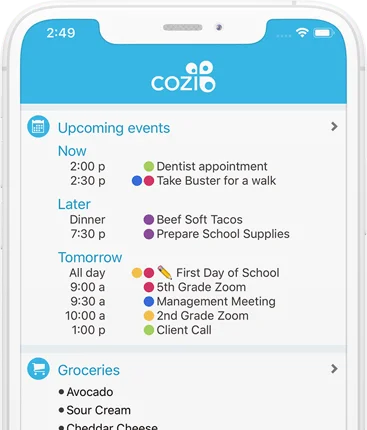
Cozy is primarily known as a family organizer that includes shared calendars, to-do lists, a family journal, and other features. One of those features is the Cozi Recipe Box & Dinner Planner, which lets you save recipes from your favorite websites, add ingredients to your shopping list, and create your family’s weekly meal plans. The Cozi includes some cool features, like a cooking mode that keeps the screen on while you follow a recipe, and the ability to connect multiple devices.
How much does Cozi Family Organizer cost?
Cozi Family Organizer is a free app, and all of its meal planning features are free. However, if you prefer an ad-free version, you can pay a few extra dollars per month.
6. Pepperplate
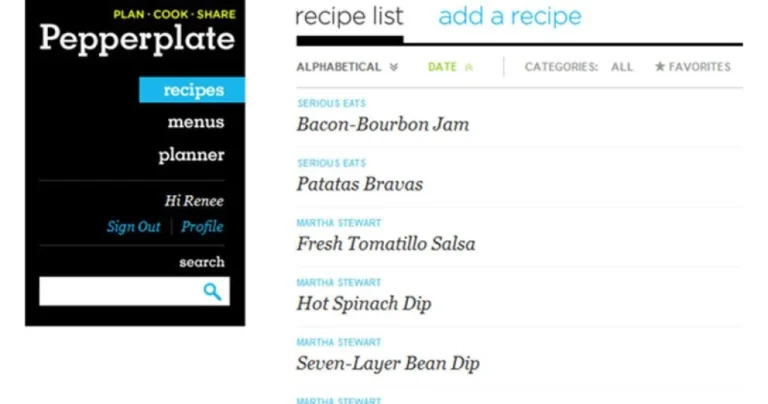
Pepperplate is a meal planning app that lets you organize your favorite recipes and get suggestions for new recipes you might like. It can become your digital cookbook, not only storing recipes, but also helping you create menus and plan your week.
Like some of its competitors, it lets you share your favorite recipes with family and friends. It also lets you create shopping lists from your weekly menu (although it doesn’t direct you to an online supermarket with home delivery). Pepperplate also has a cooking mode that lets you keep the screen on so you don’t have to touch your phone with dirty hands.
How much does Pepperplate cost?
Pepperplate has two special features. It’s available on a variety of devices, including Google Play, iTunes, the Amazon Appstore, the Windows Store, and Nook. And it’s free. In other words, it offers many of the same features as other meal planning apps, but for free.
7. BigOven
BigOven is a meal planning app that includes its own collection of half a million recipes. It also lets you import recipes from the internet or take photos of handwritten recipes and upload them to the app. You can sort recipes by category and use filters to easily find what you’re looking for. As you add meals to your calendar, you can add ingredients to your shopping list.
BigOven’s most interesting feature is the “Use Leftovers” feature, which lets you enter the ingredients you want to use up and the app will generate recipe variations. The main drawback is that not all features are available in the free version.
How much does BigOven cost?
If you want to enjoy all the benefits of BigOven, the $2.99 per month or $24.99 per year plan is worth it. Both plans offer a free trial so you can try them out without any obligation.
8. Eat This Much

Eat This Much is a combined meal planner and calorie counter. When you sign up, you enter personal information like your height, weight, and health goals. You also provide information about your dietary preferences (paleo, vegetarian, vegan, Mediterranean, etc.), your budget, and your schedule. The app creates a meal plan for you, as well as a list of ingredients that you can buy from online supermarkets.
You can also import recipes from the internet or manually, calculate calories for popular restaurant dishes, and use the barcode scanner to find out the nutritional value of packaged foods. Eat This Much also includes a stocking feature, so when you’re done grocery shopping, you can keep track of what’s in your pantry and avoid overeating.
How much does Eat This Much cost?
With Eat This Much, you have to opt for a paid plan to use the meal planner. The premium plan costs $4.99 per month when paid annually or $8.99 per month when paid monthly.
9. Allrecipes Dinner Spinner

Allrecipes has been around for years and has become a go-to resource for user-reviewed recipes. Its Dinner Spinner app boasts a community of over 50 million cooks and 50,000 recipes. It’s essentially a social app focused on food. Its feed gets smarter as you use it, offering recommendations based on the chefs you follow and the recipes you’ve made. You can search for recipes by keywords, ingredients, dietary restrictions, and time constraints.
How much does Allrecipes cost?
Allrecipes is available on multiple devices and is completely free.
10. Prepear
Prepear is considered the ideal meal planning app for foodies, so it’s no surprise that many famous food bloggers have collaborated with it. It has a database of over 100,000 rated recipes uploaded by its community of users. You can also upload your own recipes and set your dietary preferences to see only the recipes that are relevant to you. Once you find recipes you like, you can add them to your weekly meal planner. The ingredients are added to your shopping list, which you can order directly from the app.
Like Allrecipes Dinner Spinner, Prepear also includes a social section that allows you to connect with friends and get recipe inspiration.
How much does Prepear cost?
Prepear has a free and a paid version for $59 per year.
Save Time, Money, and Frustration
As you can see, each of the top 10 meal planning apps has its own unique approach and strengths. What they all have in common is that they will save you time, money, and frustration. While it may take a short adjustment period to get into the habit of meal planning, once you do, your life will never be the same.