

Jimdo helps you create a website tailored to your industry with text, photos, and other details in just 3 minutes. Dolphin is used by entrepreneurs, musicians, photographers, and even people who just want to share their stories and inspiration. The company has over 200 employees in Hamburg, the Netherlands, and Tokyo, and its tool has been used to build over 25 million websites.
PROS
- Very easy to use
- Excellent technical support
- Competitive pricing
CONS
- The editor is somewhat limited.
- Cannot add custom code.
How Jimdo Works
Jimdo is a website building and web hosting service based in Hamburg, Germany. The company was founded in 2007 and has gone through several variations of its website building. In its latest version, Jimdo has removed the templates and uses artificial intelligence to help you launch a new website.
Jimdo is ideal for those who want to create a customized website for their website as quickly as possible. It’s also quite affordable and a good budget option if you don’t mind giving up some control over your site’s design.
Using Jimdo
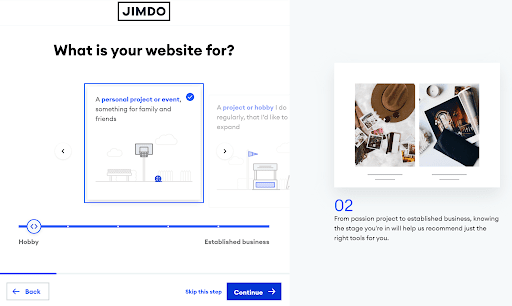
Creating a website with Jimdo is quick and easy. It uses an automated website builder to help you get started, after which you can customize your site section by section, rather than element by element. While this doesn’t offer a lot of flexibility, it’s ideal for getting up and running as quickly as possible.

Jimdo Features and Tools
Web Hosting
All Jimdo plans include web hosting, although storage and bandwidth limits vary depending on the plan. You also get a free SSL certificate and domain for one year with paid plans.
Logo Designer
Jimdo has a logo designer to help you create a brand for your online business. Simply enter your business name and category, and it will immediately suggest a logo design. There are several options for customizing your design, and you can download the final product as an SVG file.

How to Create a Website with Jimdo
The process of creating a website with Jimdo is a little different from other website builders. Instead of choosing a template, you’ll answer questions about your business and the types of pages you want to include on your site. Based on that, Jimdo will use artificial intelligence to suggest several personalized options for your site. Simply choose the one you like best and start customizing it with the page editor.
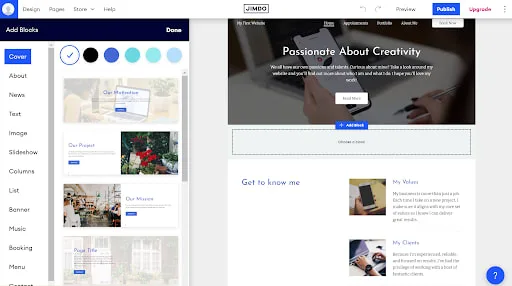
Jimdo doesn’t let you drag and drop individual content elements, such as text fields or images, onto your pages. Instead, you can only add page blocks, each of which contains multiple content elements. For example, a block can include an image and a text field, a banner, or a gallery. Jimdo has dozens of pre-designed blocks that make it easy to quickly create content for your site. You have very little control over the layout of each block, although you can show or hide individual content elements within them.
It’s worth noting that Jimdo also doesn’t give you much control over the styling of your site; you can customize the color palette, fonts, and button shapes, but that’s about it. There are no options to change the block’s layout, navigation bar design, or the footer of your site. All Jimdo sites are mobile-friendly, but customizing your site’s appearance isn’t easy.
Jimdo’s approach to web design will appeal more to those who want to get their site up and running quickly than to those who want tight control over the design. It’s easy to create a custom site in minutes, but the options for creating a unique look or design are very limited.
Adding Multimedia to Your Jimdo Website
Jimdo lets you import images and videos from your computer, Facebook, and Instagram. If you choose to import images when creating your site, AI Designer will include them in the sites it suggests. Jimdo stores all of your images in a media library, making it easy to add alt text and reuse them anywhere on your site.
Jimdo also lets you add audio to your site using a Spotify or iTunes link. However, you can’t add documents or PDFs.
Marketing Functionality with Jimdo Websites
Jimdo has very few marketing features. You can import images and videos from social networks, but you can’t automatically post site updates to your pages. Additionally, Jimdo doesn’t support blogs or email marketing/newsletter tools.
SEO Functionality & Add-Ons with Jimdo Websites
Jimdo’s paid websites include SEO tools that help Google discover them. All sites are optimized for mobile devices, and you can click to have Google re-index them after making significant changes. You can also edit the meta titles and descriptions of all your pages. It even offers personalized tips to help you maximize your site’s SEO potential.
Jimdo doesn’t offer its own analytics tools; instead, the platform provides instructions on how to integrate with Google Analytics to monitor your site’s statistics.

Ecommerce
Jimdo is one of the most affordable platforms for building an e-commerce site. We weren’t impressed with the e-commerce features, but they work well enough for traditional brick-and-mortar stores.
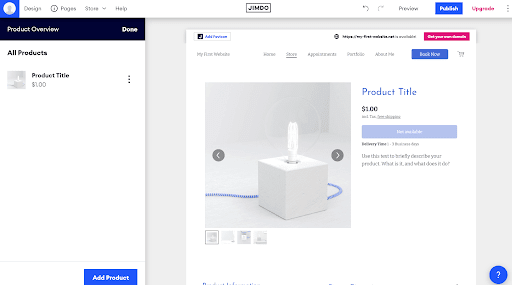
You can design products using the same page editor as the rest of your site. In fact, products are just a type of block that you can add to any page. This gives you some flexibility, but it also means you can’t add SKUs or track inventory. You also can’t sell digital downloads or organize products into categories that visitors can search or filter.
However, it does have some useful features for traditional stores. The Business plan lets you sell products on Facebook and Instagram, as well as create discount codes and product variants. You can also set custom shipping rules.
Jimdo Customer Support
Jimdo offers 24/7 customer support via email only. The company offers different response times depending on your plan. Grow, Basic, and Business customers can expect a response in less than 4 hours, while Play and Start customers can expect 1 to 2 days.
Jimdo has a comprehensive online support center, but it doesn’t include many screenshots or videos. Additionally, many support articles link to an outdated version of the website builder.
Jimdo Pricing
Jimdo offers 5 plans, including one free one. Three of them are designed for basic websites and two are designed for e-commerce websites. All plans except the free one include a free domain for 1 year. What’s more, all plans are annual and come with a 14-day money-back guarantee.
Jimdo vs Wix
Wix is one of the most flexible website builders on the market and offers a wide selection of content elements. It’s ideal if you want complete control over your website design, although it can take significantly longer to build than Jimdo. Wix offers a much wider range of e-commerce and marketing tools, but its e-commerce plans start at $23 per month.
Jimdo vs WordPress.com
While Jimdo isn’t specifically designed for bloggers, WordPress.com is primarily designed for them. All of WordPress.com’s paid plans allow you to sell products, and the more advanced plans allow you to place paid ads on your blog. However, WordPress.com is significantly more expensive if you want to sell internationally or access marketing and SEO plugins.
Jimdo vs Squarespace
Squarespace offers a significant degree of design flexibility and control, which sets it apart from Jimdo. What’s more, Squarespace’s tools for online stores, email marketing, and blogging are much more comprehensive than Jimdo’s. However, you can pay extra for advanced features. Squarespace plans start at $12 per month, and eCommerce plans start at $26 per month.
Bottom Line
Jimdo is an intuitive website builder that uses artificial intelligence to create a custom website in minutes. It’s a good option if you want to launch a website or online store as quickly as possible. Jimdo is also affordable compared to other website builders, and you can get started for free with the Play plan. The downside is that you lose a lot of creative freedom. You can’t drag and drop individual content elements, and the styling customization options are quite limited. Furthermore, it doesn’t have many marketing features and doesn’t support blogging. Therefore, it’s ideal for website builders who prioritize value and don’t mind keeping things simple.