Bill.com is a solution for automating your accounts payable and receivables that integrates with cloud-based accounting software like QuickBooks. While Bill.com has some unique features, competitors like Sourcery can offer a more dynamic and customizable solution based on your specific needs.
Here’s what you need to know about these innovations for your office tools, including which one might be right for you.
Bill.com Features
Bill.com offers a wide range of features to help businesses effectively manage their accounts payable and receivables workflows. Here are some of the key features of Bill.com:
Accounts Payable Automation
Bill.com automates the accounts payable process by capturing invoices, scanning them, and submitting them for approval. The process of automating accounts payable begins with capturing invoices by scanning or emailing them to a specific email address, then scanning them to retrieve relevant information.
Bill.com has a feature called Inbox that allows suppliers to electronically send their invoices to a unique email address created by Bill.com. Inbox on Bill.com (Source: Bill.com)
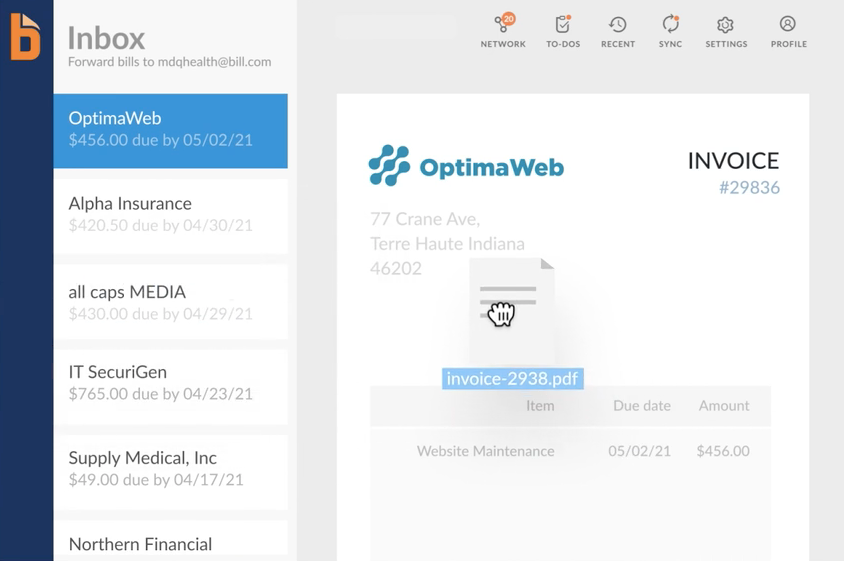
After a supplier sends invoices to your Bill.com Inbox, the program will automatically extract relevant information from the invoice, including the invoice number, date, amount owed, and payment due date. This information will be used to create a digital record of the invoice that can be easily accessed and managed from within the Bill.com platform.
Once the invoice is in the system, you can review and approve the payment, set up payment schedules, and even send the payment directly through the Bill.com platform. By automating this process, you can save time, reduce errors, and improve the efficiency of your accounts payable workflows.
Accounts Receivable Automation
Bill.com makes it easy to create invoices by providing invoice templates or the ability to upload your own.
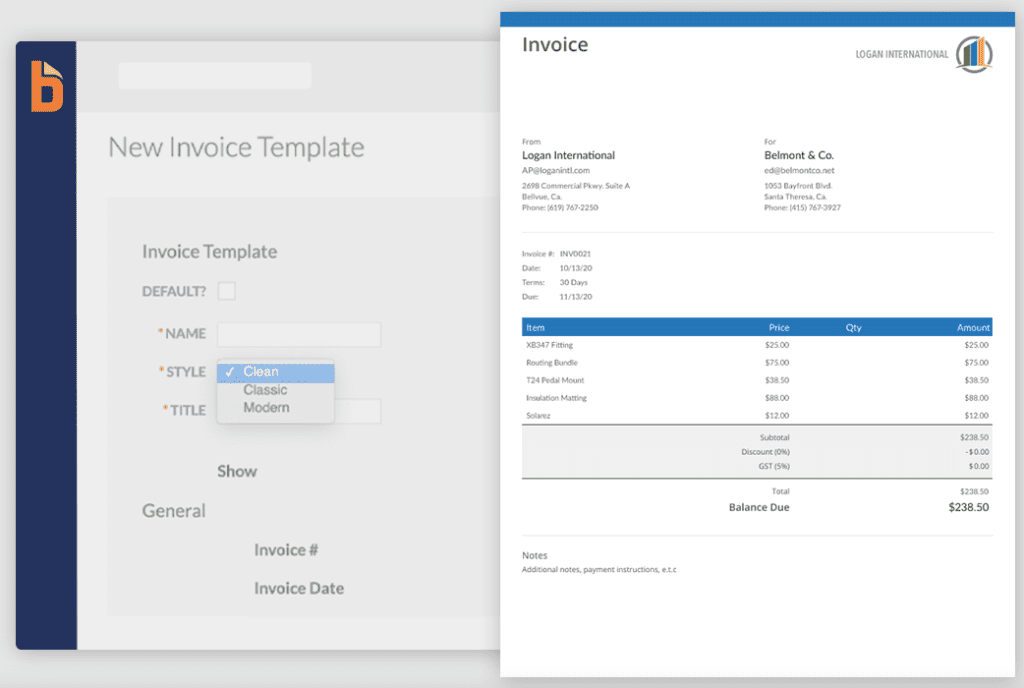 Once created, invoices can be sent electronically via email, and businesses can track their status in real time through Bill.com. Once an invoice is sent, Bill.com automates the payment processing process, allowing customers to pay electronically via ACH or credit card, and providing businesses with real-time payment tracking.
Bill.com also allows businesses to schedule recurring invoices that can be automatically sent to customers on a regular basis. In addition, it can send automatic reminders to customers with unpaid invoices, reducing the need for manual follow-up.
Document Management
With Bill.com, you can store and manage invoices, receipts, packing slips, and other financial documents in a centralized location, making it easy to find and retrieve documents when needed. Bill.com’s document management feature enables electronic document storage and eliminates the need for paper documents, reducing manual work and improving efficiency.
Companies can upload documents directly to Bill.com or register them by scanning and sending them to a specific email address. Once uploaded or registered, documents are digitized, making them easy to find and retrieve using Bill.com’s advanced search features.
OPEN AN ACCOUNT
Customizable Approval Workflows
In Bill.com, approval workflows can be customized to suit each company’s approval process and include multiple approval levels and specific rules for different document types. Users are tasked with approving invoices based on their role within the organization. For example, an invoice can be automatically sent to a manager for approval before being sent to the finance department for final approval. This allows companies to maintain tight control over their approval process, ensuring that invoices are only paid after they have been approved by the appropriate parties.
Custom rules can also be set up within Bill.com approval workflows. These rules can be based on criteria such as invoice amount, vendor, or department, and can determine which users are responsible for approving certain invoices. For example, invoices over a certain dollar amount can be automatically
Creating an Invoice Approval Workflow in Bill.com (Source: Bill.com)
Bill.com approval workflows allow businesses to track the approval process in real time and receive notifications when invoices are approved. This gives businesses real-time visibility into their financial transactions and helps ensure that invoices are paid on time.
Automatic Bill Codification
One of the best features of Bill.com is that it learns from past transactions, allowing the system to automatically assign the correct general ledger (GL) codes based on the company’s historical data. As invoices are entered into Bill.com, the system analyzes past transactions to identify patterns and set rules for automatically coding invoices. For example, if a company consistently assigns a GL code to invoices from a particular supplier, the system will learn this pattern and automatically apply the same code to future invoices from that supplier.
The system also takes into account any changes made by the user to the GL codes during the approval process. If the user changes the general ledger code assigned by the system, it learns from this change and applies it to future invoices with similar criteria.
Automatic invoice coding saves time by eliminating the need to manually categorize invoices. It also reduces the risk of errors by ensuring that invoices are categorized consistently and assigned the correct general ledger codes. Finally, it provides companies with real-time visibility into their financial transactions, making it easier to track costs and analyze spending patterns.
Reporting & Analytics
With Bill.com, you can create custom reports based on specific criteria, such as vendor, expense category, or project. Reports can be generated in a variety of formats, including PDF, CSV, and Excel, and can be easily exported to accounting software or shared with stakeholders.
In addition to generating reports, Bill.com offers companies a dashboard that displays key financial metrics, such as cash flow, outstanding invoices, and payable invoices. The dashboard also provides visual representations of data, such as charts and graphs, making it easy for businesses to identify trends and patterns in their financial data.
What to Look for in an Accounts Payable/Receivable Solution
An automated accounting solution can help you streamline your office management. It’s a way to collect payments faster and manage accounts more efficiently. However, there are a wide variety of solutions to choose from. Some, like Bill.com, focus almost exclusively on digital invoicing, automated payments, and account reconciliation.
Others, like Sourcery, are comprehensive solutions that include vendor management, as well as efficient invoicing and automated reconciliation. Specifically designed for restaurant workers as well as small startups, Sourcery offers specialized invoice ordering and receiving features that Bill.com lacks.
When looking for the right platform, you may need to decide whether you need just an invoicing tool or a comprehensive invoice management solution.
Bill.com Overview and Features
True to its name, Bill.com’s main function is to facilitate domestic and international payments. It covers all aspects of accounts payable, including electronic invoicing and various money transfer features.
With Bill.com, you can receive digital invoices from suppliers and ensure quick approval. You can also create and send invoices to your customers and receive payments via ACH, ePayment, PayPal, or credit card. The platform easily syncs with major accounting software, such as Oracle, Xero, QuickBooks, and Sage.
Bill.com Reviews and Pricing
Bill.com has generally positive reviews. Users appreciate the automated features and ease of payment approval. Some Capterra users noted that the preview window could be improved. Others noted sync issues and limited rules functionality. PC Mag noted that it doesn’t work as a double-entry system and can therefore seem lacking in features. However, the magazine emphasized that Bill.com doesn’t try to do everything that other solutions do.
Some users on G2crowd have reported frequent errors when syncing with accounting software.
Sourcery Overview and Features
While Bill.com focuses on payments, Sourcery offers a number of benefits for restaurants and small businesses. These include automated invoicing, online bill pay, internal ACH, and domestic and international check processing. It integrates with Xero, QuickBooks, Sage, and other major software.
Sourcery has extensive vendor management capabilities that allow for online ordering. The software is designed for food businesses that often need to amend invoices or issue credit notes due to food spoilage during delivery. With Sourcery, these changes are simple and hassle-free. The platform allows for quick contact with suppliers, eliminating the time-consuming manual and outdated ordering processes.
Additionally, automated invoice scans are converted into actionable data. Restaurants get the cost analysis they need. The platform includes price alerts that allow owners to better control their spending on perishables. With this functionality, Sourcery can help customers make important business decisions and balance their accounts.
Sourcery has a strong customer support team. Every Sourcery customer has a dedicated account manager to help with any issues. The support team is always available to each user so that customers can take full advantage of the product’s features.
OPEN AN ACCOUNT
How to evaluate which is best
To choose the solution that best suits your needs, it will be useful to review some of the key advantages and disadvantages of each platform.
Bill.com
- Pros: Bill.com does a great job of automating invoices and increasing the efficiency of payments. The approval processes are simple. The platform has extensive international payment options.
- Cons: The subscription is for a single user, and there are additional transaction fees. Some users have complained that Bill.com’s integration with their accounting software isn’t as seamless as they would like. Others have complained about the lack of customer service.
Sourcery - Pros: Sourcery is specifically designed for restaurant owners. It offers powerful analytics on inventory and price changes so owners can monitor costs. It offers invoice scanning, similar to Bill.com, and also includes payment capabilities. Its direct ordering feature streamlines relationships with suppliers. Customer service and predictable pricing round out this platform’s strengths.
- Cons: Since it doesn’t specifically focus on accounts payable functionality, it can take more time to explore all of its features.
Perhaps the best way to determine which platform works best for your business is to try it out. Contact Sourcery today and request a free demo to see if the product can help improve your business’s efficiency and success.