

Jimdo helps you create a custom website with text, photos, and other details that match your industry in just 3 minutes. Dolphin is used by entrepreneurs, musicians, photographers, and even people who just want to share their stories and inspiration. The company has over 200 employees in Hamburg, the Netherlands, and Tokyo, and its tool has been used to build over 25 million websites.
PROS
Very easy to use
Excellent support
Competitive pricing
CONS
The editor is somewhat limited.
Doesn’t allow you to add custom code
How Jimdo Works
Jimdo is a website building and hosting service based in Hamburg, Germany. The company was founded in 2007 and has gone through several versions of its website building software. In its latest version, Jimdo has removed the templates and uses artificial intelligence to help you launch a new website.
Jimdo is ideal for those who want to create a custom website as quickly as possible. It’s also quite affordable and a good option if you don’t mind giving up some control over your site’s design.
Using Jimdo
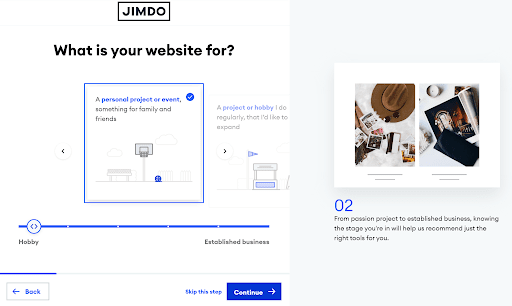
Creating a website with Jimdo is quick and easy. It uses an automated web designer to help you get started, after which you can customize your site in sections of the page, rather than element by element. While this doesn’t give you a lot of flexibility, it’s ideal for getting up and running as quickly as possible.
Jimdo Features and Tools
Web Hosting
All Jimdo plans include web hosting, although storage and bandwidth limits vary by plan. You also get a free SSL certificate and a free domain for one year with paid plans.
Logo Designer
Jimdo has a logo designer to help you create your online business identity. Simply enter your business name and category, and it will immediately suggest a logo design. There are several options for customizing your design, and you can download the final product as an SVG file.
How to Create a Website with Jimdo
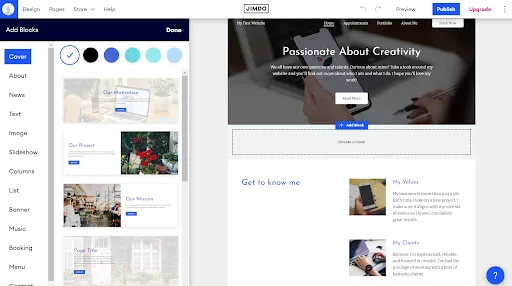
The process of creating a website with Jimdo is a little different from other website builders. Instead of choosing a template, you’ll answer questions about your business and the types of pages you want to include on your site. Based on this information, Jimdo will use artificial intelligence to offer you several personalized options. Simply choose the one you like best to customize it with the page editor.
Jimdo doesn’t let you drag and drop individual content elements, such as text fields or images, onto your pages. You can only add page blocks, each of which contains multiple content elements. For example, a block could include an image and a text field, a banner, or a gallery. Jimdo has dozens of pre-designed blocks that make it easy to quickly create content for your site. You have very little control over the layout of each block, although you can show or hide individual content elements within them.
It’s worth noting that Jimdo also doesn’t give you much control over the styling of your site; you can customize the color palette, fonts, and button shapes, but that’s about it. There are no options to change the block layout, navigation bar layout, or the footer of your site. All Jimdo sites are mobile-friendly, but it’s not easy to customize their appearance on mobile devices.
Jimdo’s approach to web design will appeal more to those looking for a quick fix than to those who want complete control over their site’s design. It’s easy to create a custom site in minutes, but the options for creating a unique look or design are very limited.
Adding Multimedia to Your Jimdo Website
Jimdo lets you import images and videos from your computer, Facebook, and Instagram. If you choose to import images when creating your site, AI Designer will include them in the suggestions. Jimdo stores all of your images in a media library, making it easy to add alt text and reuse them anywhere on your site.
Jimdo also lets you add audio to your site using a Spotify or iTunes link. However, you can’t add documents or PDFs.
Marketing Functionality with Jimdo Websites
Jimdo has very few marketing features. You can import images and videos from social networks, but you can’t automatically post updates from your site to your profiles. Additionally, Jimdo doesn’t support blogs or email marketing/newsletter tools.
SEO Functionality & Add-Ons with Jimdo Websites
Jimdo paid sites include SEO tools that help Google find your site. All sites are optimized for mobile devices, and you can click to have Google reindex your site after making significant changes. Additionally, you can edit the meta titles and descriptions of all your pages. It even offers personalized tips to increase your site’s SEO potential.
Jimdo doesn’t offer its own analytics tools; instead, the platform provides instructions on how to integrate with Google Analytics to monitor your site’s statistics.
Ecommerce
Jimdo is one of the most affordable platforms for building an ecommerce site. While we’re not impressed with its ecommerce features, they’re good enough for standard online stores.
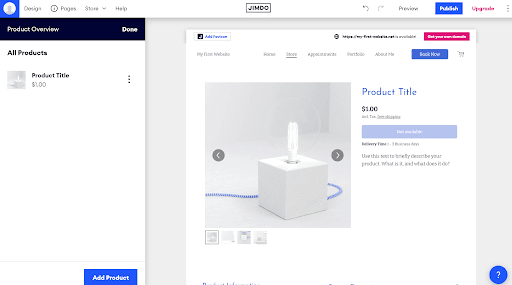
You can design products using the same page editor as the rest of your site. Essentially, products are just a type of block that you can add to any page. This gives you some flexibility, but it also means you can’t add SKUs or manage inventory. You also can’t sell digital downloads or organize your products into categories that visitors can search or filter.
However, it does have some useful features for online stores. The Business plan lets you sell products on Facebook and Instagram, as well as create discount codes and product variants. You can also set custom shipping rules.
Jimdo Customer Support
Jimdo offers 24/7 customer support via email only. The company offers varying response times depending on the plan. Customers on the Grow, Basic, and Business plans get a response in under 4 hours, while customers on the Play and Start plans can expect 1 to 2 days.
Jimdo has a detailed online support center, but it doesn’t include many screenshots or videos. Additionally, many support articles are for an outdated version of the website builder.
Jimdo Pricing
Jimdo offers 5 plans, including a free one. Three of the plans are designed for basic websites, and two are designed for online stores. All plans except the free one include a free domain for 1 year. What’s more, all plans are billed annually and come with a 14-day money-back guarantee.
Jimdo vs Wix
Wix is one of the most flexible website builders on the market and offers a wide selection of content elements. It’s ideal if you want complete control over your website design, although it can take significantly longer to set up than Jimdo. Wix offers a much wider range of e-commerce and marketing tools, but its e-commerce plans start at $23 per month.
Jimdo vs WordPress.com
While Jimdo isn’t specifically designed for bloggers, WordPress.com is primarily designed for them. All of WordPress.com’s paid plans allow you to sell products, and the more advanced plans allow you to place paid ads on your blog. However, WordPress.com is much more expensive if you want to sell internationally or access marketing and SEO plugins.
Jimdo vs Squarespace
Squarespace offers a significant degree of flexibility and design control, which sets it apart from Jimdo. Furthermore, Squarespace’s tools for online stores, email marketing, and blogging are much more comprehensive than Jimdo’s. However, keep in mind that advanced features come at an additional cost. Squarespace plans start at $12 per month, while eCommerce plans start at $26 per month.
Bottom Line
Jimdo is an easy-to-use website builder that uses artificial intelligence to create a custom website in minutes. This is a good option if you want to launch a website or online store as quickly as possible. Jimdo is also affordable compared to other website builders, and you can get started for free with the Play plan.
The downside to Jimdo is that it offers a significant loss of creative freedom. You can’t drag and drop individual content elements, and the styling customization options are quite limited. Additionally, it doesn’t have many marketing features and doesn’t support blogging. Therefore, it’s best suited for those who prioritize value and prefer simplicity.